TailwindsApp
Tailwinds App
Support
Tailwinds gives you a personalized wind and weather report that’s specific to your bicycle ride.
To view the weather report for your commute, you’ll need to configure your home and work locations, as well as your commute times, in Settings. Once you’ve completed the configuration, you’ll be able to see the forecast for your rides to and from work, for both the current day and for tomorrow.
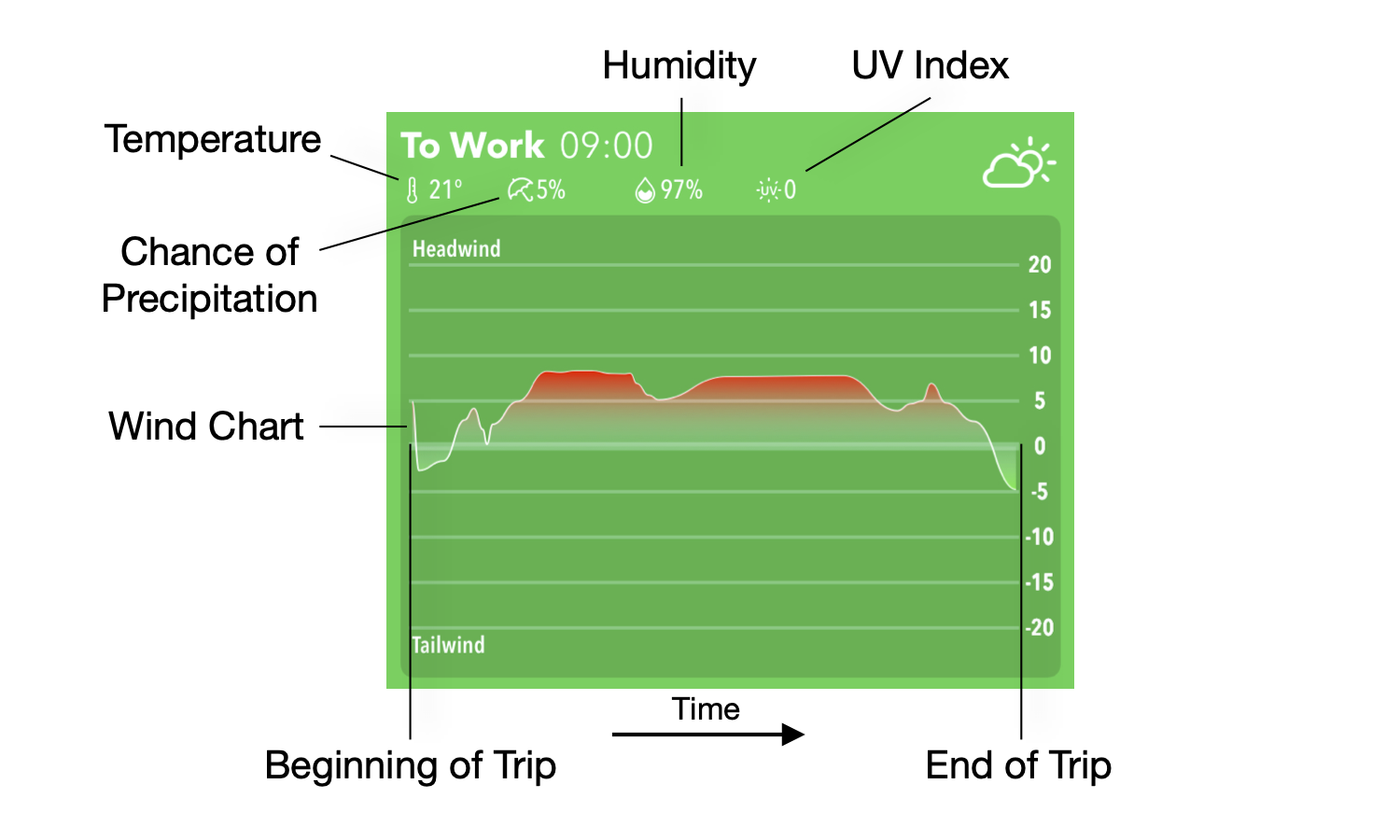
The wind chart forecasts you the headwind or tailwind that you’ll be facing at any given moment along your journey. For example: if you are traveling north for some segment of your trip, and the weather forecasts that the wind will be blowing to the south, the wind chart will show that you’ll be facing a headwind during that particular portion of your trip. The full chart gives you an at-a-glance picture of what the winds will be like over the entirety of your journey.
You may configure your tolerance for various weather conditions in settings. If the weather for your trip is within the tolerance you set, the background for that trip will be green. If the weather does not fit the requirements you configured, the background color will be red.
Tailwinds is currently only supported within the United States. More regions are coming soon!
Tailwinds is a work-in-progress, with many more features and improvements to come!
For support or to get in touch, please contact us here!